
Guide · Plans and billing
Plans and billing
Rootegra Academy has three plans. Each one is sold in the iPhone app as an auto-renewing subscription through the App Store and billed to your Apple Account. The price and billing period are shown in the app before you confirm.
No mentor yet? The Study plan is the one you buy yourself.

On this page
01The three plans
How many apprentices are you training?
- Fits you
Academy
Bought by the mentor
One mentor and one apprentice.
- Fits you
Academy Plus
Bought by the mentor
One mentor and up to two apprentices.
- Fits you
Study
Bought by the apprentice
One apprentice studying on their own, with no salon.
Each plan can be billed monthly or yearly. The current price for each plan and period is shown in the app and on the App Store.
What a mentor plan opens
- Every lesson and quiz in your state’s curriculum, plus exam prep, for you and your apprentice or apprentices.
- The practice games that go with the lessons.
- Your apprentice’s seat. On Academy, one apprentice is included; on Academy Plus, seats for two apprentices are included. The apprentice pays nothing.
A Study plan opens every module for the apprentice’s state: all the lessons, practice games, quizzes, and exam prep.
Choosing between Academy and Academy Plus
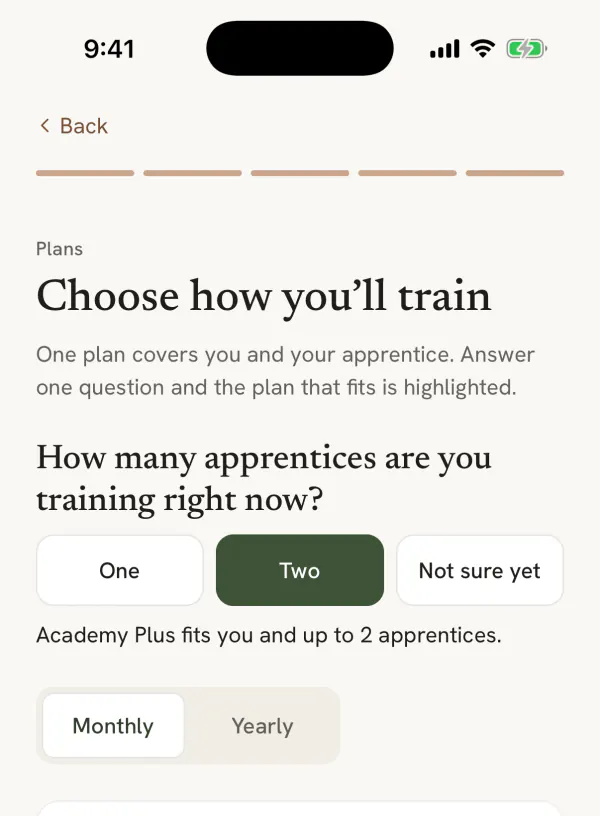
During setup, the plan screen asks one question: How many apprentices are you training right now? Answer One and Academy is highlighted; answer Two and Academy Plus is highlighted. Not sure yet starts on Academy. You can pick either plan by hand.
02What works without a plan
With or without a plan
- Logging hours and approving them
- Practical sign-offs
- Daily tasks
- The board-ready hours export
- The first chapter and the Getting registered module
Opens with a plan
- The rest of the lessons
- The quizzes
- Exam prep
- The practice games
These work the same for the mentor and the apprentice. A new salon’s lessons stay closed until a plan is bought.
03Free trial
A plan may begin with a free trial. Every plan carries a one-week free trial, as the App Store offers it. Apple decides whether your Apple Account is eligible.
04Billing, canceling, and refunds
Rootegra Academy is sold through the App Store only. Apple bills the subscription to your Apple Account, and Apple handles changes, cancellations, and refunds.
- RenewalA subscription renews automatically for the same period and price unless canceled at least 24 hours before the end of the current period.
- Change or cancelOn your iPhone, open Settings › Apple Account › Subscriptions. In the app, the plan card has a Manage button that opens the same Apple page: mentors find the card under More › Settings, apprentices under Profile.
- Deleting the app does not cancela subscription. Access continues until the end of the period already paid for.
- Refundsare handled by Apple, not by Rootegra. Ask at reportaproblem.apple.com.
- Price changesIf a price goes up, Apple tells you first, and the increase applies only after you agree or as Apple’s rules allow.
Restoring a purchase
If you bought a plan and the app still shows the plans, tap Already subscribed? Restore purchases on the plan screen, or Restore purchases on the plan card in Settings or Profile. The app asks the App Store for purchases made with the Apple Account on this device and says either “Purchases restored.” or “No purchases found to restore.”
05Who pays
The mentor buys Academy or Academy Plus, and the apprentice’s seat is included in that plan. An apprentice on a mentor’s plan sees Academy with the line “Included with your mentor’s plan” on the plan card in Profile, and buys nothing.
The Study plan is for an apprentice studying on their own, who buys it themselves. A seat code from a mentor on an Academy plan also opens the modules; it is entered on Learn under Have a code from your mentor? Mentors create seat codes under More › Settings.
06When a plan ends
The curriculum closes. Hour logs, sign-offs, progress, and the hours record stay in the account and can still be exported. The terms are in section 05 of the Terms of Use.