
Guide · Questions
Questions, answered
Answers grouped by topic. Search for a word, pick a topic, or start with the ones asked most.
Can’t find yours? Email [email protected] and we’ll answer.

No question mentions that
Try one plain word, or one of these. A person also answers [email protected] within two business days, Hawaii time.
01Getting started
What is Rootegra Academy?
An iPhone app for a salon apprenticeship. A licensed mentor trains an apprentice in their own salon; the apprentice studies the lessons, logs hours from the salon, and practices the skills, and the mentor approves the hours and signs off the practicals. The app keeps the record in the layout the state board expects. The state board registers the apprenticeship and issues the license.
Does Rootegra Academy register my apprenticeship or give me a license?
No. The state board registers the apprenticeship and issues the license, and in California a program sponsor is required. Finishing modules does not by itself meet any state requirement, and the app does not replace classroom hours a state requires. Rootegra keeps the record. See the state notes.
Which states does it cover?
Hawaii and California. You choose the state during setup, and the curriculum and hours follow that state’s board.
How do I get the app?
Rootegra Academy is an iPhone app on the App Store. Download it, then tap Create an account and choose I mentor apprentices, I have an invitation code, or I’m studying on my own.
Can I take the tour again?
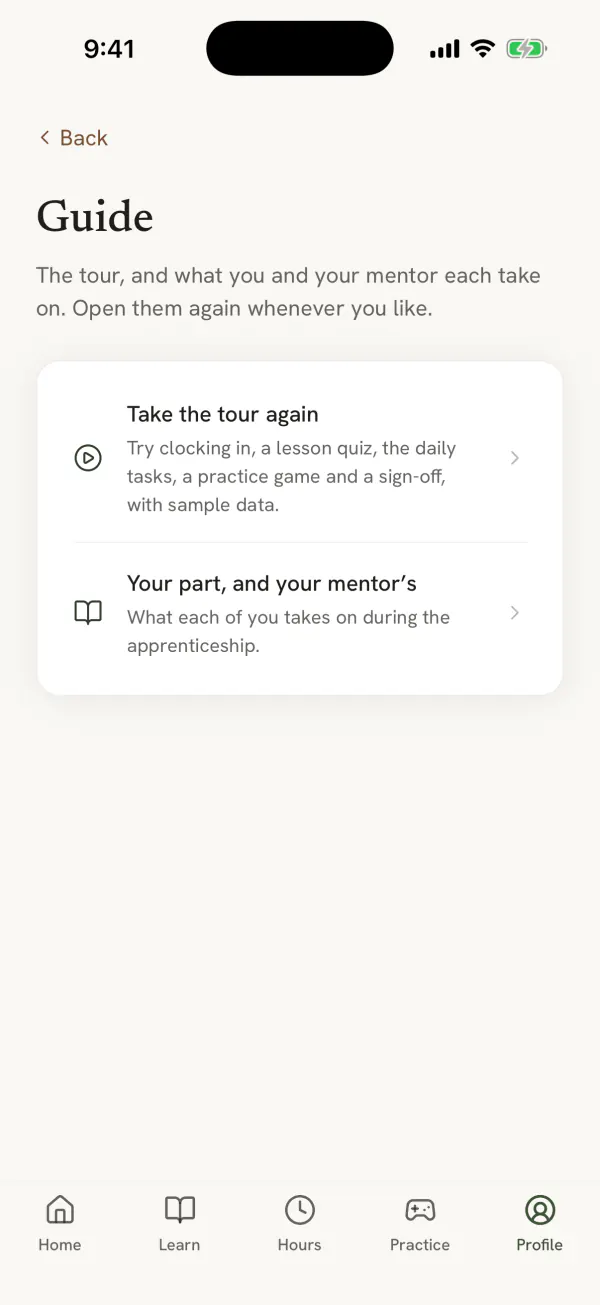
Yes. Mentors open More › Mentor guide › Take the tour again. Apprentices open Profile › Guide › Take the tour again.
02Plans and billing
What does each plan cover?
Academy covers one mentor and one apprentice. Academy Plus covers one mentor and up to two apprentices. Study is for one apprentice studying on their own. Each is billed monthly or yearly. See Plans and billing.
How much does it cost?
The current price of each plan and billing period is shown in the app before you confirm, and on the App Store.
Does my apprentice have to pay?
No. The apprentice’s seat is included in the mentor’s Academy or Academy Plus plan. The apprentice’s plan card in Profile says “Included with your mentor’s plan.”
Is there a free trial?
A plan may begin with a free trial: one month on Academy and Academy Plus, and one week on Study, as the App Store offers them and as Apple allows for your Apple Account. When a trial applies, the plan screen says so and the button reads Start the free trial of the plan. Cancel at least 24 hours before the trial ends to avoid the first charge.
What works without a plan?
Logging hours and approving them, practical sign-offs, daily tasks, the board-ready hours export, and the first chapter and the Getting registered module. The other lessons, quizzes, exam prep, and practice games open with a plan.
Can I buy a plan on the website?
No. Rootegra Academy plans are sold in the iPhone app through the App Store only, and billed to your Apple Account.
How do I cancel or change my plan?
On your iPhone, open Settings › Apple Account › Subscriptions, or tap Manage on the plan card in the app (mentors: More › Settings; apprentices: Profile). Cancel at least 24 hours before the renewal date. Deleting the app does not cancel a subscription.
How do I get a refund?
App Store purchases are refunded by Apple, not by Rootegra. Ask at reportaproblem.apple.com.
What happens to the record when a plan ends?
The curriculum closes. Hour logs, sign-offs, progress, and the hours record stay in the account and can still be exported.
03Hours and records
When do hours start counting?
Only after the state permit or license exists. Hours worked before then do not count, and the apprentice may not train or serve clients before then. Only hours the mentor approves count toward the apprentice’s total.
I forgot to clock in. What do I do?
Request an edit. On Hours, tap Request a time edit, choose Add missed hours, enter the real start and end times, the category, and a reason, and tap Submit request. Do not clock in and out later to cover the time.
I forgot to clock out. What happens?
A shift nobody clocked out of is closed after 14 hours with an estimated end time. Request an edit with Adjust an existing entry and the real clock-out time, and your mentor approves it.
What is in the export for the board?
Under More › Export, Hours record (PDF) builds one PDF per apprentice: one line per day worked with hours, services, and notes, monthly totals, and signature lines for the apprentice and the mentor, with the permit or license number in the header. Build the export also makes a ZIP of spreadsheet files with every record.
What do no-show, no-call, and excused mean?
A scheduled shift with no clock-in is marked a No-show. No call, no show means the apprentice missed it without telling anyone ahead. Excused means the mentor agreed to the absence. The mentor can change any mark in Hour approvals, and the apprentice sees each mark in their shift history.
04Lessons and practice
Can I retake a quiz or an exam?
A lesson quiz records your first answer to each question, and there is no retake; the module’s final exam is the graded check. The final exam needs 70 percent to pass, has no time limit, and can be retaken. Every attempt stays on the record for your mentor, and the higher score is kept.
Why is a lesson locked?
Lessons in a module open in order, so a lesson opens after the one before it is finished. A lesson can also be locked because your mentor requires the salon location for lessons and you are not at the salon, or because the module needs a plan. The first chapter is open to everyone.
Do the practice games count against me?
No. The practice games are open any time, never locked, and never counted toward a module, with no timer and no limit on tries.
05Mentors
How many apprentices can I train?
The plan covers one apprentice on Academy and up to two on Academy Plus. Your state also sets a limit: in Hawaii a supervisor has one apprentice at a time, and in California a trainer may have up to two.
How do I sign off a practical?
Open Apprentices › Practicals, open the practical, check the steps as you watch, and tap Pass. If the skill is not there yet, tap Not yet, choose what to review, and reopen it later with Reopen for another attempt.
What reminders will I get?
On a day when something is waiting, you get one summary at 7:05 AM Hawaii time. It is the same clock time for every salon, so on the mainland it arrives later in the morning. It comes in the app, by email, and as a phone notification if you allow notifications, and it lists hour entries waiting more than 3 days, practicals ready to schedule, modules coming due, an apprentice who has gone quiet, and paperwork still open. A day with nothing waiting sends nothing, and there is no setting to turn the summary off.
Separately, a practical that sits ready with nothing scheduled sends a reminder after 14 days, or after the number of days you set in Settings.
How do I send an apprentice agreement?
Agreements are sent from Rootegra Pro on the web, for salons that use Pro. The Academy app does not send them. The apprentice signs a sent agreement in the app.
06Apprentices
Where do I enter my permit or license number?
Open Learn, open Getting registered, and tap License received. Enter the number as printed, the state, and the date it arrived. To fix a typo later, open Profile › My details.
I am studying on my own. How do I join a salon later?
When a salon sends you an invitation code, open Profile › Join a salon and enter it. Your account connects to the salon, and hours, daily tasks, and your mentor’s sign-offs start there.
What is a seat code?
A code from a mentor on an Academy plan that opens the modules for you. It reads STUDY- followed by six characters. Enter it on Learn under Have a code from your mentor? and tap Redeem code. A seat code is not the same as a salon invitation code.
Does my mentor see my location?
Your mentor sees the location saved with each clock-in and nothing else. Rootegra reads your location only when you tap Clock In or Clock Out, only while the app is open, and never asks for the always-on permission.
07Account and privacy
How do I delete my account?
Apprentices: Profile › Delete account. Mentors: More › Settings › Delete account. Type DELETE to confirm. You can also email [email protected] from the address on the account.
Deleting removes your sign-in, your personal details, your lesson notes, your game history, and your notifications. Your name and email are cleared, and your staff record is renamed “Deleted account.” Logged hours and finished practical sign-offs stay in the salon’s training records under the name “Deleted account.” Lesson, module, and exam progress is kept but is no longer linked to you. Practicals, modules, and tasks that are still open are removed.
Get a copy of the record before you delete; the mentor builds it under More › Export. A mentor whose salon has only apprentices can delete their account; each apprentice keeps their own account, hours, and sign-offs. A salon with other staff, clients, or upcoming appointments needs a new owner first, so write to us and we will move it. The salon itself is never deleted. See the Privacy Policy.
I signed in to the wrong account. How do I switch?
Sign out and sign in with the right email. Apprentices: Profile › Sign out. Mentors: Sign out at the top of More. During setup, the first screen has Not you? Sign out. If one login has more than one salon or role, Switch experience moves between them.
Who can see my records?
An apprentice’s name and email go on their apprenticeship records, and only their salon sees them. Notes are private to the person who wrote them. The Privacy Policy covers the rest.
08Troubleshooting
My invitation code does not work.
A code expires 14 days after it is made, and a revoked code stops working at once. Check that you typed all six characters. Ask your mentor for a new invitation; an expired one offers Send a new invitation on their side. If the code starts with STUDY-, it is a seat code: enter it on Learn instead.
I cannot clock in.
If your salon requires the salon location, Clock in works only within 150 meters of the salon, and the screen says how far away you are. If location is off for Rootegra, turn it on in the iPhone’s Settings app, then tap Clock in. If your salon does not require the location, you can clock in anywhere. For time away from the salon, choose Working from home and add a note.
I forgot my password.
On the sign-in screen, type your email and tap Forgot password?. We email a reset link that opens the app, where you choose a new password of at least 10 characters. A link works once; request another if it has expired. You can also tap No password? Email me a sign-in code.
I bought a plan but the app still shows the plans.
Tap Already subscribed? Restore purchases on the plan screen, or Restore purchases on the plan card in Settings or Profile. The app says “Purchases restored.” or “No purchases found to restore.” If it does not clear, write to [email protected] with the email you sign in with.
Can I make the text larger, or use dark mode?
Yes. The app follows your iPhone’s settings: text size and Bold Text under Settings › Display & Brightness or Accessibility, and Dark Mode under Settings › Display & Brightness. Lesson text grows up to twice the standard size. There is no separate setting inside the app.
Something else is wrong.
Write to [email protected] and a person answers within two business days, Hawaii time. Say which screen you were on, what you tapped, and what happened, and include your device, iOS version, and the app version at the bottom of Profile or Settings. See Support.
No answer here? Write to [email protected]. Say which screen you were on, what you tapped, and what happened.